Voron 2.4 3D Printer Review

9/10

The Voron 2.4 is a high-speed 3D printer with exceptional precision, offering a large build volume and fast printing speeds up to 500 mm/s, which is ideal for advanced users.

However, its DIY nature requires significant technical expertise, as users must source individual components and handle a complex assembly. The total cost can exceed $1,000, making it less accessible for beginners.

9/10

Manufacturer: Voron

The Pros
The Cons
Picture of Scott Gabdullin
Scott Gabdullin

Co-Founder & CEO

Amazon.com Disclosure: As Amazon Associates, we earn from qualifying purchases.

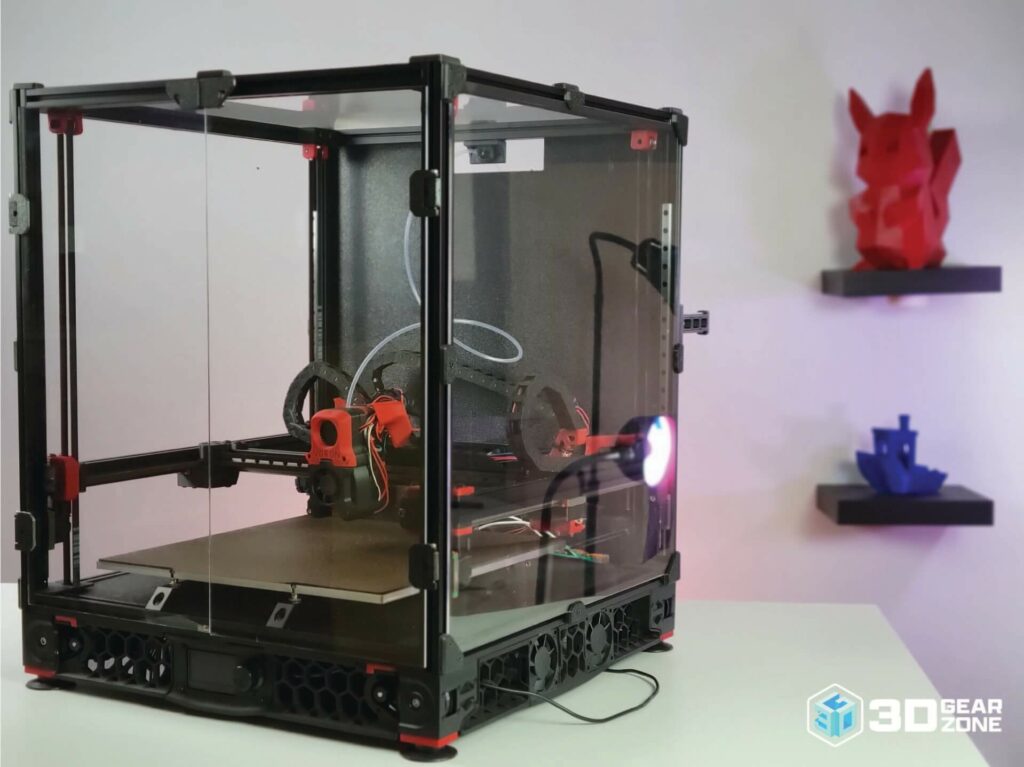
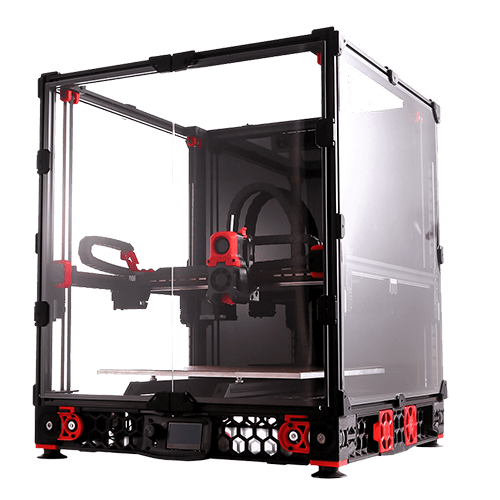
The Voron 2.4 is a beast of a DIY 3D printer built for speed, precision, and reliability. Designed by engineers and enthusiasts, it’s a coreXY printer that delivers high-performance results without the usual compromises of off-the-shelf options. 

As an open-source machine, it’s not sold as a standard, ready-to-run product—instead, it’s available in the form of kits from various suppliers, each with their own level of quality and support. This means your experience can vary depending on where you source your parts.

In this review, we’ll discuss the Voron 2.4’s build process, technical specs, print quality, and overall value. We’ll also cover real-world performance, insights from the community, and what to expect if you decide to build it yourself.

An Overview of the Voron Brand

Today, Voron has carved out its place as the name serious builders turn to for high-performance DIY 3D printers. These machines are built for people who don’t want to settle. You get precision, strength, and a platform that invites you to dive deep into modding and fine-tuning.

What sets Voron apart is its pairing of premium components with an open-source design. It gives you full control. You can tweak everything, from hardware to firmware, until your setup runs precisely how you want it.

The Voron 2.4 is where it all comes together. It’s fast, it’s strong, and it’s built to handle serious workloads. You get core XY motion, a clean design, and flexibility that rewards builders who like to push limits. It takes effort to assemble, but once it’s dialed in, you’ll see why so many builders swear by it.

Voron’s Community and Open-Source Ethos

Voron printers are not sold as kits by the official team. Instead, the entire design is open-source, meaning anyone can build one by sourcing their own parts.

The community plays a tremendous role here, contributing upgrades, troubleshooting issues, and constantly improving the design. If you run into problems or want to modify your build, there’s a massive Discord server and forum filled with enthusiasts willing to help.

Unboxing and Building the Voron 2.4

Building a Voron 2.4 is a hands-on adventure, and here’s a rundown of what you can expect when you crack open the box and dive into the assembly process.

What’s in the Box?

Right away, you’ll notice the sheer amount of parts. The package includes aluminum extrusions for the frame, metal brackets, and many high-quality 3D-printed parts. Everything is well-organized, which helps when you’re staring down an overwhelming mountain of screws and wires.

Stepper motors, a controller board, and a solid power supply round out the electrical side. The wiring is neatly bagged and labeled, which saves you a ton of guesswork.

They also include pre-printed parts for cable management and sensor mounts. In addition, you receive a 100+ page manual and a USB drive with firmware files and configuration presets.

Highlights of our unboxing include:

  • Neatly organized parts that simplify assembly.
  • Clearly labeled wiring and components.
  • Comprehensive manual and firmware support on USB.
  • Design focused on reducing build stress and confusion.

Building the Machine

The Voron 2.4 can be built anywhere between 25 to 50 hours.

First, you’ll build the frame. Squaring up the aluminum extrusions is critical; if you get this wrong, you will deal with print issues forever. As such, take your time, employ a machinist’s square, and make sure everything is perfectly aligned.

Next comes the belt system. This part can be tricky, especially making sure both belts have equal tension. A quick tip: use a simple tension tester or print a makeshift tool to measure it properly. Rushing through this step can lead to print artifacts and missed steps.

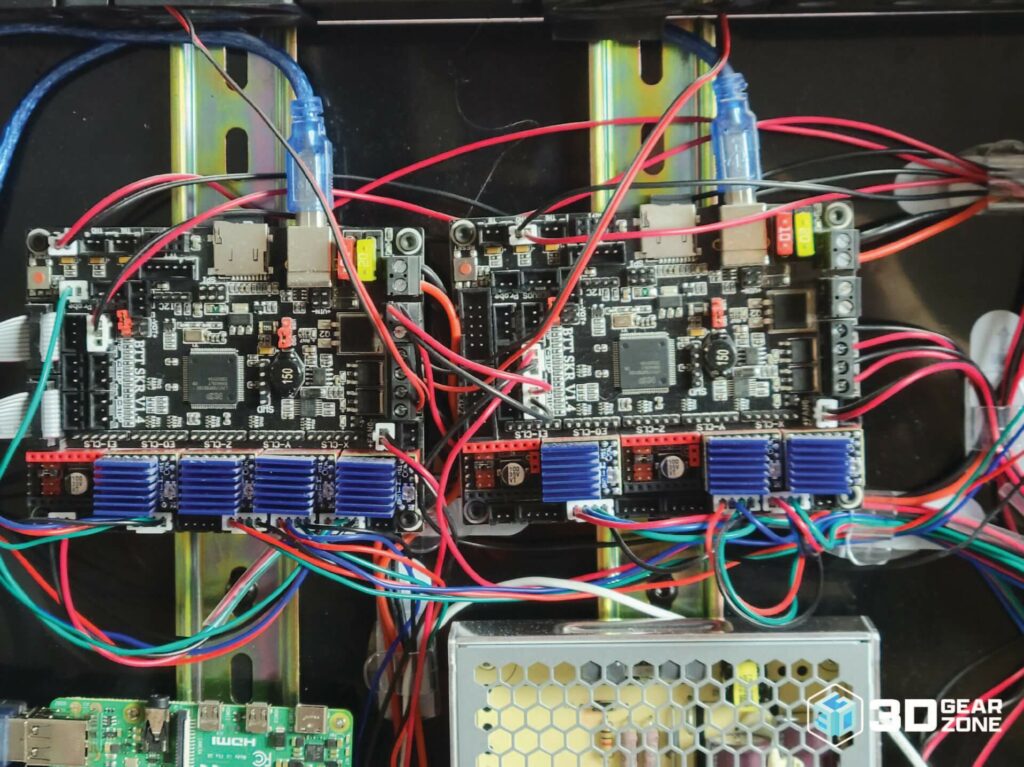
Once the mechanics are dialed in, it’s time for wiring. Connect everything carefully: sensors, thermistors, stepper motors, and the heated bed. Labeling wires as you go during this stage makes troubleshooting easier later.

Firmware setup is the last big hurdle. Load the pre-configured files, fine-tune the bed leveling, and do a few test prints. The Z-axis needs precise calibration, so expect some trial and error before getting a perfect first layer.

StageTime EstimateKey ChallengesTips/Notes
Unboxing & Inventory Check30–60 minutesEnsuring all parts are present, identifying small componentsCross-check against the official checklist. Sort small parts into labeled containers to avoid losing anything.
Mechanical Assembly10–15 hoursAligning gantry, squaring the frame, fitting 3D-printed parts, managing fastenersUse a machinist’s square to ensure perfect alignment. Gradually tighten screws to avoid warping printed parts.
Belt and Motion System2–4 hoursSetting equal belt tension, ensuring smooth motion without bindingUse a belt tension gauge or printed tool to match tension on both sides. Double-check pulley alignment.
Electronics & Wiring5–7 hoursRouting cables cleanly, proper crimping and soldering, avoiding shortsLabel all wires before connecting. Use cable sleeves or clips to organize wires neatly. Double-check the polarity of power connections.
Firmware Installation2–3 hoursFlashing Klipper or other firmware, ensuring hardware compatibilityUse a known working config from the Voron GitHub repo. Keep a backup of default settings before making changes.
Calibration & First Prints5–7 hoursBed leveling, tuning input shaper, setting correct extrusion valuesRun automatic bed mesh leveling. Use a calibration cube and fine-tune acceleration settings in Klipper.

Our Initial Impressions on Build Quality

When everything is assembled, the build quality speaks for itself. The frame is rock-solid, and the 3D-printed parts fit together with impressive precision. If anything, it feels a lot more like a high-end industrial machine than a DIY project.

The belts and motion system move smoothly, and there’s no flex or wobble anywhere. The whole thing feels built to last, which you want in a printer designed for high-speed performance.

Overall, we’d have to say that assembling the Voron 2.4 is a challenge, but it’s worth every minute. If you like building and fine-tuning machines, you’ll love this process. The end result is a seriously capable printer that feels custom-built to handle whatever you throw at it.

Design, Build Quality, and Technical Specifications

The Voron 2.4 is built like a tank but still looks sleek and modern. Every design choice is aimed at maximizing stability, print quality, and overall performance. Let’s break down what makes this printer stand out.

Key Technical Specifications

  • Build Volume: 350mm (l) x 350mm (w) x 355mm (h)
  • Printer Size: 520mm (l) x 520mm (w) x 580mm (h)
  • Weight: 20kg
  • Enclosed Print Area: Yes
  • Display: Monochrome LCD
  • Drive Type: FDM Direct (all metal)
  • Filament Capability: PLA, ABS, PETG, TPU,
  • Connectivity: WiFi
  • Drivers: TMC2209
  • Build Surface: Flexible PEI
  • Heated Bed: Yes
  • Bed Leveling: Automatic
  • Nozzle Diameter: 0.4mm
  • Maximum Hotend Temperature: 280 °C
  • Maximum Movement Speed: 200mm per second
  • Maximum XY Accuracy: 0.1mm
  • Minimum Z Height: 0.1mm
  • Number of Extruders: 1
  • Filament Diameter: 1.75mm
  • Supported materials: PLA, ABS, PETG, TPU,
  • 3rd Party Filament Support: Yes
  • Operating System: Windows, macOS, Linux
  • Supported Slicers: Prusaslicer, Slic3r, CURA, Simplify3D
  • Supported File Types: STL, OBJ, M3F

Robust and Sleek Design

This thing is big. With a footprint of around 500 x 500 mm and a fully enclosed build area of 350 x 350 x 350 mm, it’s designed to handle large, high-quality prints without breaking a sweat. The enclosure isn’t just for looks because it keeps heat consistent, which is especially important for materials like ABS, ASA, and polycarbonate.

Aesthetically, it has a clean, industrial look. If you like your machines to look as good as they perform, the Voron 2.4 won’t disappoint.

Innovative Mechanical Features

Instead of relying on one Z-axis lead screw like most printers, the Voron 2.4 has a quad gantry leveling system with four independently driven motors that adjust the bed to keep it level. As such, you do not have to mess with manual leveling; you get perfectly even the first layers every time.

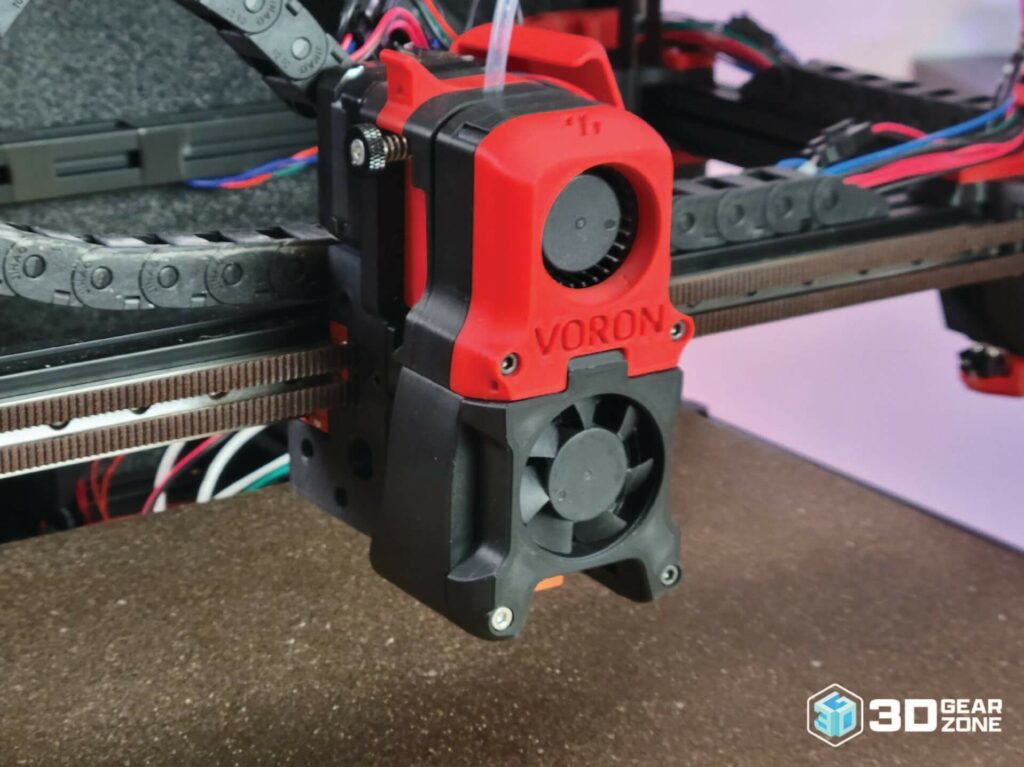
Another standout feature is the 3:1 direct drive extruder. With a geared ratio for extra torque, it efficiently handles flexible filaments like TPU while still being fast and responsive enough for high-speed printing. Unlike Bowden setups, the direct drive keeps retractions short and precise to reduce stringing and improve print quality.

On top of that, the all-metal hotend is built for high-temperature printing. It can handle materials up to 300°C, making it perfect for engineering-grade plastics. If you’ve ever had issues with PTFE-lined hotends breaking down over time, you’ll appreciate the reliability of this setup.

Safety and Reliability Features

The Voron 2.4 isn’t just powerful, as it’s built with safety in mind. Thermal runaway protection is a critical feature, cutting power to the heater if it detects irregular temperature fluctuations. This helps prevent overheating and potential fire hazards.

Cable management is also well thought out. Unlike some DIY 3D printers, where wires hang everywhere, Voron’s design keeps everything neatly tucked away. The drag chains and pre-planned routing paths make the printer look clean and prevent wear and accidental snags.

Then there’s the mains-powered heated bed. Instead of waiting forever for your bed to heat up, this setup reaches printing temperatures quickly and stays stable. It’s powered through a solid-state relay (SSR), which guarantees safer power delivery and reduces electrical load on the control board.

The Voron 2.4 is built for speed, but speed doesn’t mean much if print quality takes a hit. A fast printer that spits out sloppy prints is useless. What makes the Voron 2.4 different is that it balances speed and precision better than most high-end DIY 3D printers out there.

Speed and Precision

Right out of the box, the Voron 2.4 is tuned to print at 120 mm/s, which is already fast compared to most consumer-grade printers that average 50–60 mm/s. But with some fine-tuning and a strong cooling setup, it can easily push beyond 250 mm/s while maintaining great accuracy.

A lot of that performance comes down to the CoreXY motion system.

Unlike Cartesian-style printers, where the bed moves on the Y-axis, CoreXY keeps the bed stationary on the Z-axis. In contrast, the printhead moves in both X and Y. This means less weight shifting around, allowing for higher speeds without losing precision.

Of course, speed isn’t the only factor. Accuracy is what really separates the Voron 2.4 from others in its class. The quad gantry leveling system keeps the bed perfectly level at all times. Because the frame is rock solid, there’s practically no flex or wobble, even during aggressive acceleration moves.

Ringing and ghosting are usually problems at high speeds, but the Voron 2.4 minimizes those issues thanks to input shaper calibration in Klipper firmware. More on that later, but the short version is that it actively reduces vibrations, so your prints stay sharp and clean.

Test Prints and Benchmark Results

To really test print quality, we ran a few standard benchmarks, starting with a 20 mm calibration cube. At 120 mm/s, the cube came out with sharp edges, consistent extrusion, and no visible artifacts. Even when we increased the speed up to 200 mm/s, the dimensions stayed accurate, and the surface finish was surprisingly smooth.

Next was the classic Benchy test, but we wanted to push things, so we ran it at 200 mm/s. Some printers would struggle with overhangs and fine details at that speed, but the Voron handled it well.

The cooling system kept up, preventing drooping on the front of the boat, and the text on the bottom was still legible. There was some slight ringing in the hull, but that was primarily due to our input shaper settings needing a final tweak.

We printed a Snorlax figure with small textures and sharp overhangs for a more detailed test.

At a layer height of 0.15 mm, the details were crisp, and the thin parts of the Pokemon were printed without issues. The Voron’s direct drive extruder played a big role here, keeping retraction settings dialed in so there was almost no stringing on the final product.

Layer consistency was another highlight. We ran a 200 mm tall tower to check for banding or shifts, but every layer was stacked perfectly. This is where the quad gantry system shines.

On a typical printer with a single Z lead screw, minor imperfections can build up over time. But because the Voron constantly adjusts itself, those issues are completely eliminated.


Test TypeResult HighlightsObservations
Calibration Cube20.1×20.1 mm average dimensionsExcellent repeatability (<0.1 mm deviation)
Detailed ModelExceptional resolution and minimal ringingInput shaper tuning is crucial for the best results
Overhang & BridgeOverhangs up to 65°; bridges up to 60 mmCooling and speed adjustments improve quality
Print TowerPerfect layer consistencyThe quad-gantry system keeps everything leveled

Firmware, Tuning, and Calibration

The Voron 2.4 runs on Klipper firmware, which is what gives it such smooth motion and high-speed performance. Marlin handles everything on the printer’s mainboard, but Klipper offloads processing to a Raspberry Pi. With that extra power, it calculates movements faster and improves print quality.

Among Klipper’s best features is the input shaper. It measures vibrations and applies real-time corrections to keep prints sharp, even at high speeds. Running the input shaper calibration test takes some time, but the improvement is massive once it’s set up. Ghosting is reduced, corners stay sharp, and fine details print cleaner.

One other important setting is pressure advance. It fine-tunes extrusion to keep filament flow consistent during fast movements. Without it, you’ll see blobbing at corners where the extruder lags. When tuned correctly, the Voron 2.4 keeps extrusion smooth across accelerations and decelerations, preventing these issues.

To get the best performance from the Voron 2.4, these adjustments make a huge difference:

  • Input Shaper Calibration: Reduces ringing and ghosting by compensating for vibrations.
  • Pressure Advance: Keeps extrusion flow steady, preventing blobs at corners.
  • Belt Tensioning: Ensures even movement in CoreXY systems to avoid skewed prints.
  • Z Offset and First Layer Tuning: Proper Z height leads to strong bed adhesion and smooth first layers.
  • PID Tuning: Stabilizes hotend and heated bed temperatures for consistent extrusion.
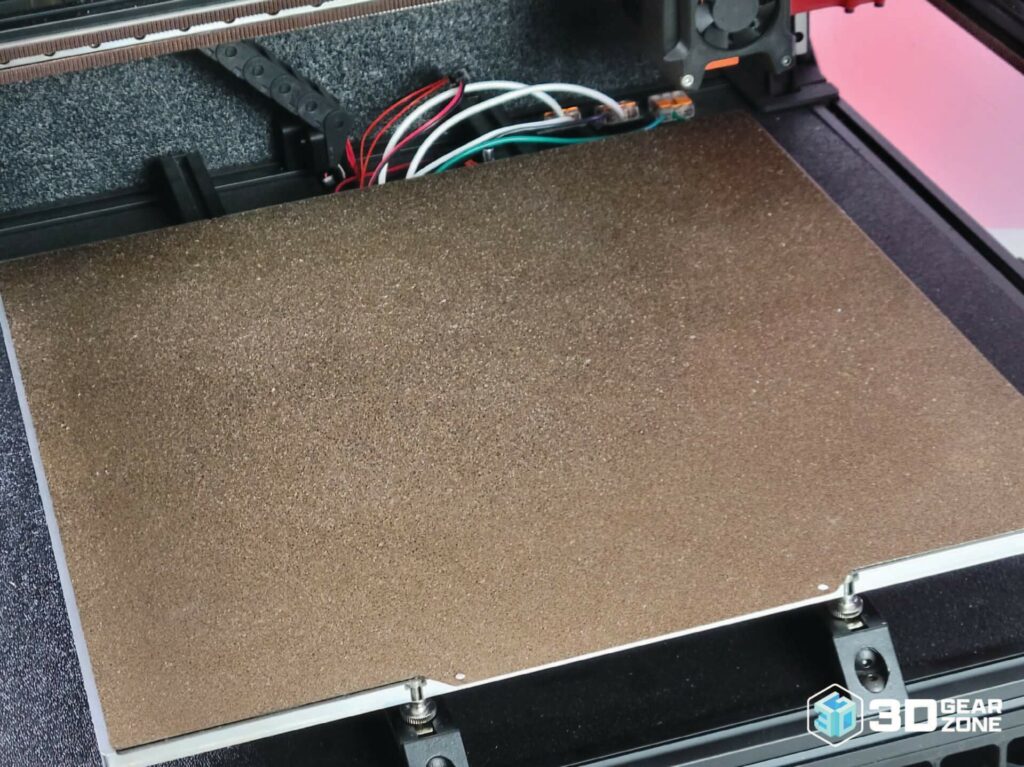
Then there’s belt tensioning. CoreXY printers rely on even belt tension to avoid skewed prints, and the Voron’s design makes it easy to get it right. You can use a printed belt tension meter or go-by feel, but either way, keeping the belts equally tight on both sides is key to accurate prints.

The Voron 2.4 is a beast right out of the box. Voron provides the core design, but most advanced features come from third parties or the community.

If you want smoother prints, improved control, or a more refined machine, the right upgrades will boost your printer’s performance.

Premium Hardware Upgrades

First off, a touchscreen interface is a solid add-on. The default setup relies on an external computer or SSH commands, but a dedicated screen like a BTT TFT or a Raspberry Pi touchscreen makes controlling your printer a lot easier. This upgrade isn’t standard with the Voron 2.4—you have to pick it up separately.

Upgrading the extruder is another smart move. The stock Stealthburner setup performs well, yet third-party options like Bondtech LGX gears or Revo Voron hotends improve filament control and high-flow performance. If you plan to print faster or tackle demanding materials like ABS or polycarbonate, these upgrades keep your extrusion consistent.

For those using an LDO kit, the 2.4-300 variant comes with improved linear rails, custom motor mounts, and a pre-wired electronics kit. If you want a smoother build process with top-tier components and money isn’t an issue, this option is one of the best.

Connectivity and Control Enhancements

Printing over USB is fine, but wireless control makes everything more convenient. OctoPrint is one of the most popular remote monitoring and print management options. Once it is set up on a Raspberry Pi, you can start and stop prints, adjust settings, and even check in on a webcam feed without being near the printer.

If you’re looking for something more advanced, Fluidd and Mainsail have optimized interfaces designed for Klipper-based setups. They provide real-time print stats, customizable dashboards, and a more responsive user interface than OctoPrint.

For the best experience, consider adding a dedicated Raspberry Pi with a decent power supply. Underpowering the Pi can lead to crashes and failed prints, so making sure it has stable voltage is key. A UPS (uninterruptible power supply) also helps prevent sudden shutdowns if you live in an area with unstable electricity.

Customization and Modding Potential

One of the main reasons people go for the Voron 2.4 is the crazy level of customization. Since it’s an open-source design, nearly every part of the printer can be modified or improved based on personal preference. The community has come up with hundreds of printable mods, ranging from aesthetic changes to full-blown functional upgrades.

Some of the most popular mods include:

  • Gantry Braces – Adds extra rigidity to reduce frame flexing at high speeds.
  • Stealthburner LED Mods – Customizable RGB lighting for the print head, purely for style points.
  • Toolhead PCB Upgrades – Simplifies wiring and reduces clutter in the print head area.

If you’re into tinkering, the Voron ecosystem is full of possibilities. Want a different build size? Print custom panels and frame spacers. Need better cooling? Experiment with alternative fan setups. With the Voron community, there is always somebody working on the next significant improvement.

Maintenance, Upkeep, and Reliability

Keeping the Voron 2.4 in top shape is straightforward if you stay on top of routine maintenance and lean on the community for support. In our experience, maintaining this printer is less about complicated repairs and more about uncomplicated, regular checks that prevent issues before they start.

Component Availability

One of the best things about Voron’s printers is how easy it is to find replacement parts. Most components are off-the-shelf or printable, so you won’t be stuck waiting weeks for a rare part. With multiple suppliers and a strong community, sourcing your requirements is rarely an issue.

We follow a simple maintenance schedule to keep everything in top shape:

  • Inspect belts, screws, and wiring for any signs of wear every week.
  • Run a quick calibration print to catch small inaccuracies.
  • Verify firmware settings remain consistent.
  • Clean cooling fans monthly to prevent dust buildup.
  • Re-tension belts if prints show misalignment.
  • Check wiring connections and re-solder any loose joints.

A great advantage of the Voron is that many of its 3D-printed parts can be reprinted if needed. If you ever have trouble finding a part, the community is always sharing vendor recommendations and even pre-printed replacements on Discord.

Common Issues with the Voron 2.4

No printer is flawless, and the Voron 2.4 has its pitfalls. Here are some common problems and quick fixes we’ve found useful:

  • Uneven belt tension can cause misalignment. A simple belt tension gauge or careful manual adjustment keeps things even.
  • Running a calibration print every few weeks helps catch minor shifts before they become problematic.
  • Under-extrusion or blobbing at corners usually means pressure advance needs tweaking. Adjusting this in Klipper and recalibrating the extruder gears makes a huge difference in print quality.
  • If hotend or bed temps aren’t stable, re-running PID tuning is a quick and effective fix.
  • Fans and air ducts tend to collect dust, affecting cooling and electronics. A quick cleaning schedule keeps things running smoothly.

Regular troubleshooting prevents minor problems from turning into significant failures. A bit of attention here and there makes a noticeable difference in print consistency.

Long-Term Reliability and Performance Consistency

After extensive use, we can confidently say the Voron 2.4 is built to last. Its dependable frame, quality materials, and innovative design contribute to its reliability.

  • The aluminum frame, reinforced 3D-printed parts, and sturdy fasteners make for a rigid machine that can withstand heavy printing.
  • The quad gantry leveling system keeps the bed stable, ensuring consistent first layers even over months of use.
  • Frequent firmware updates from the Klipper community refine print performance over time.
  • New mods and tweaks are constantly being developed, meaning your printer can evolve with advancements in DIY 3D printing.
  • After hundreds of print hours, I’ve seen no major shifts in quality. Calibration cubes, functional parts, and complex models all maintain tight tolerances.
  • The repeatability of this printer makes it ideal for high-precision applications and batch printing.

To keep things running smoothly, here’s a simple long-term checklist:

  1. Inspect belts, screws, and wiring weekly.
  2. Run a test print to check for dimensional accuracy.
  3. Deep clean fans and filters monthly.
  4. Re-tension belts and re-run PID tuning.
  5. Check firmware for updates.
  6. Monitor print quality and adjust settings as needed.
  7. Stay active in the Voron community to keep up with improvements.

With an engaged user base constantly sharing insights, you’re never alone in troubleshooting. Most problems have already been tackled by someone, and solutions are just a forum post or Discord message away.

Comparisons with Alternative DIY Models

The Voron 2.4 isn’t the only CoreXY machine out there. Plenty of high-performance DIY kits exist, each with its strengths and trade-offs. Here’s how it stacks up against some competitors:

  • BLV Cube – A CoreXY alternative with linear rails, but lacks the community-driven refinement of the Voron. It also lacks a fully enclosed design by default, which can be an issue for high-temp printing.
  • Railcore II – Offers similar print quality but comes in at a higher price point. Its aluminum frame provides excellent stability, but it requires a bit more effort to tune compared to the Voron’s quad gantry leveling system.
  • RatRig V-Core 3 – Another CoreXY option that competes closely with the Voron. It has a strong aluminum extrusion frame, and the modular design lets users swap parts more easily. However, the Voron community is bigger and has more documented support for new users.
  • Prusa i3 MK3S+ – A Cartesian-style printer known for its reliability and user-friendliness. While it can’t match the speed of the Voron 2.4, its out-of-the-box performance and vast documentation make it a great choice for those prioritizing reliability over raw speed.

Below is a more detailed comparison table that breaks down key features for the Voron 2.4, BLV Cube, Railcore, RatRig V‑Core 3, and Prusa i3 MK3S+:

 Voron 2.4BLV CubeRailcore IIRatRig V‑Core 3Prusa i3 MK3S+
Build Volume350 x 350 x 350 mm300 x 300 x 400 mmVaries; many models offer larger Z travel400 x 400 x 400 mm250 x 210 x 210 mm
Print Speed120 mm/s (default; built for high speeds)Moderate speeds with some tuning requiredSimilar high speeds as VoronFast performance with optimized accelerationReliable speeds with proven quality
Assembly ComplexityHigh; numerous 3D printed parts and belt systems require careful alignmentModerate; fewer parts and simpler cable managementModerate; straightforward assembly with off‑the‑shelf componentsModerate; simpler design with fewer moving partsModerate; well‑documented kit build process
Price Range$1500 – $2000Lower price point compared to VoronComparable to Voron, price depends on chosen features$1500 – $2000$750 – $1000 (kit option)
Community SupportExtensive DIY forum and active modifier baseGood; supported by a passionate communityGrowing community with niche expertiseLarge, dedicated user base that shares modsGlobal support from Prusa enthusiasts
CustomizationHighly modular; plenty of upgrades and mods availableGood upgrade options; many community modsOpen design with flexible upgrade optionsVery customizable; many proven modificationsOpen-source with extensive third‑party enhancements

Our Final Take

After putting the Voron 2.4 through its paces, we can confidently say it delivers on its reputation. The print quality, speed, and reliability make it one of the best DIY 3D printers out there. It takes time to build, but once assembled, it’s a workhorse that readily handles everything from detailed miniatures to high-strength functional parts.

This machine isn’t for someone who wants to plug in and print right away. Rather, it’s for those who enjoy the process, learning how every part works, and getting hands-on with upgrades. If that sounds like you, the Voron 2.4 is an investment that pays off with long-term performance.

If you’re serious about high-performance 3D printing and want a machine that grows with you, the Voron 2.4 is worth it. 

Disclaimer
3DGearZone.com is a professional review site that receives compensation from the companies whose products we review. We test each product thoroughly and give high marks to only the very best. We don’t guarantee, however, that our suggestions will work best for each individual or business, so consider your unique needs when choosing products and services. 3DGearZone.com is independently owned and the opinions expressed here are our own. 

As an Amazon Associate we earn from qualifying purchases.

Sources
1. VoronDesign.com, “Voron Design” Accessed July 26, 2022.

Share Article

DON'T MISS OUT!

Revolutionize your 3D printing game with incredible deals!

We get access to exclusive deals and discounts on latest 3D printers and accessories all the time. Subscribe to stay in touch! 

No thanks, I don't want to know about amazing deals
Scroll to Top